Build Content Bundle
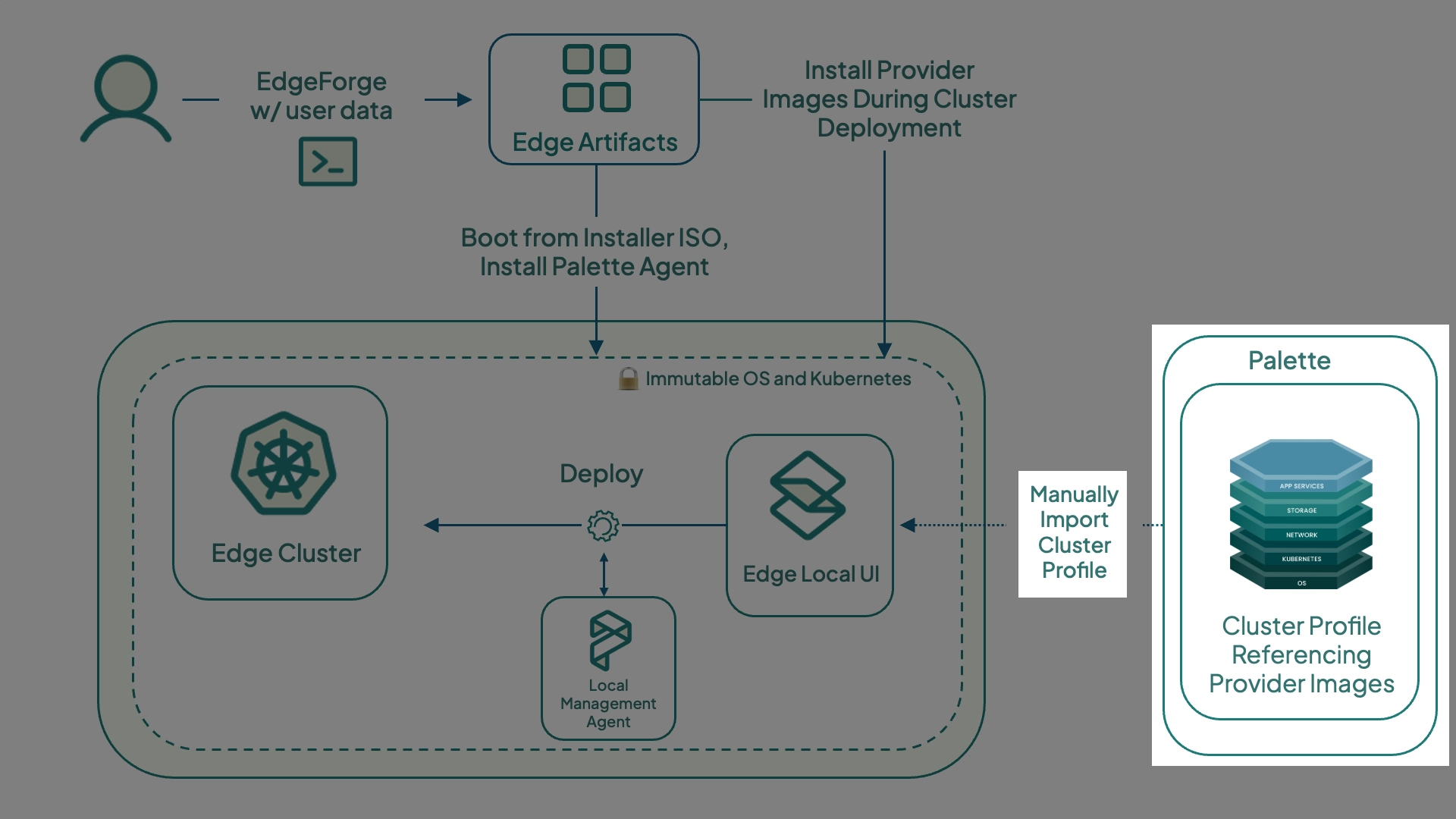
Cluster profiles are declarative, full-stack models that Palette uses to provision, scale, and maintain Kubernetes clusters. They are composed of layers, which can be Kubernetes manifests, Helm charts, or packs. Packs are a collection of files and configurations deployed to a cluster to provide core infrastructure functionality or customize the cluster's behavior through add-on integrations. With centrally managed Edge, these are automatically provisioned when the Edge device is connected to Palette. With locally managed Edge, the cluster profile needs to be exported from Palette as a Content Bundle, and upload the bundle to the Edge device.
This tutorial teaches you how to create the content bundle you created in the Deploy Edge Cluster tutorial using either the Palette CLI or Palette Edge CLI.
Prerequisites
- You have completed the steps in the Deploy Edge Cluster, and Prepare Edge Host tutorials.
- A Palette account.
- A valid Palette API Key.
- The Project ID where you created your cluster profile.
- The Cluster Profile ID.
Export and Download Cluster Profile
With the cluster profile created, you will need to export it as a compressed .tgz file. You will need to download either the
Palette CLI or Palette Edge CLI to your Linux machine.
Palette CLI
VERSION=<palette-edge-cli-version>
wget https://software.spectrocloud.com/palette-cli/v$VERSION/cli/linux/palette
chmod +x palette-edge
Palette Edge CLI
VERSION=<palette-edge-cli-version>
wget https://software.spectrocloud.com/stylus/v$VERSION/cli/linux/palette-edge
chmod +x palette-edge
- Palette CLI
- Palette Edge CLI
You will use the Palette CLI tool to authenticate against Palette, and download a specific cluster profile from a specific project.
Use the following Palette Edge ClI to generate the cluster profile compressed .tgz file.
./palette content build --arch <bundle-architecture> \
--project-id <project-id> \
--profiles <cluster-profile-id1,cluster-profile-id2...> \
--cluster-definition-name <cluster-definition-name> \
--cluster-definition-profile-ids <cluster-definition-profile-ids> \
--name <bundle-name>
Alternatively, you can use the script below to prompt you when doing the Palette Edge CLI command. The API key will appear blank for security reasons.
#!/usr/bin/env bash
set -euo pipefail

# --- Inputs ---
read -rsp "Enter Palette API key: " apikey
echo
read -rp "Enter Palette Project UID: " projectuid
read -rp "Enter Cluster Profile UID(s) (comma-separated if multiple): " profileuids
read -rp "Palette console URL [https://console.spectrocloud.com]: " console_url
read -rp "Enter custom tag (used for naming): " custom_tag
read -rsp "Enter Palette CLI encryption passphrase: " enc_pass
echo

# Default console URL
console_url=${console_url:-https://console.spectrocloud.com}

bundle_name="${custom_tag}-content-bundle"
definition_name="${custom_tag}-cluster-definition"

echo
echo "Logging into Palette CLI..."
palette login \
  --api-key "${apikey}" \
  --console-url "${console_url}" \
  --encryption-passphrase "${enc_pass}"

echo
echo "Building content bundle..."
echo "  Cluster definition: ${definition_name}"
echo "  Bundle name:        ${bundle_name}"
echo

palette content build \
  --arch amd64 \
  --project-id "${projectuid}" \
  --profiles "${profileuids}" \
  --cluster-definition-name "${definition_name}" \
  --cluster-definition-profile-ids "${profileuids}" \
  --name "${bundle_name}" \
  --include-core-palette-images-only \
  --progress

bundle_path="./output/content-bundle/${bundle_name}.tar.zst"

echo
echo "Done ✅"
echo
echo "Content bundle created:"
echo "  ${bundle_path}"
echo
echo "Transfer this file to the airgapped Edge device and upload it via:"
echo "  - Local UI"
echo "  - or: palette content upload (from a reachable system)"
echo
Alternatively, you can use the script below to prompt you when doing the Palette Edge CLI command. The API key will appear blank for security reasons.
#!/usr/bin/env bash

set -euo pipefail

# Prompt for variables
read -rsp "Enter API key: " apikey #hide the API when entered in
echo
read -rp "Enter Project UID: " projectuid
read -rp "Enter Profile UID: " profileuid
read -rp "Palette API endpoint [https://api.spectrocloud.com]: " apiendpoint
read -rp "Enter custom tag (used for naming): " custom_tag

# Default endpoint if empty
apiendpoint=${apiendpoint:-https://api.spectrocloud.com}

echo
echo "Building content bundle..."
echo "  Cluster definition: ${custom_tag}-cluster-definition"
echo "  Output file:        ${custom_tag}-content-bundle"
echo

./palette-edge build \
  --api-key "$apikey" \
  --project-id "$projectuid" \
  --cluster-profile-ids "$profileuid" \
  --cluster-definition-profile-ids "$profileuid" \
  --palette-endpoint "$apiendpoint" \
  --cluster-definition-name "${custom_tag}-cluster-definition" \
  --outfile "${custom_tag}-content-bundle" \
  --include-palette-content

echo
echo "Done ✅"
The .tgz file will need to be uploaded to the locally managed Edge device after it is built using the Edge UI. If you
are using a browser on a system other than your Linux system to access the Edge UI, you will need to download the .tgz
file.
scp <username>@<ip-of-linux-system>:/path/to/<filename>.tgz .
Next Steps
In this tutorial, you learned how to install the Palette agent on your host and register the host with Palette. We recommend proceeding to the Deploy Cluster tutorial to learn how to build the cluster content bundle to use on the locally managed Edge device.